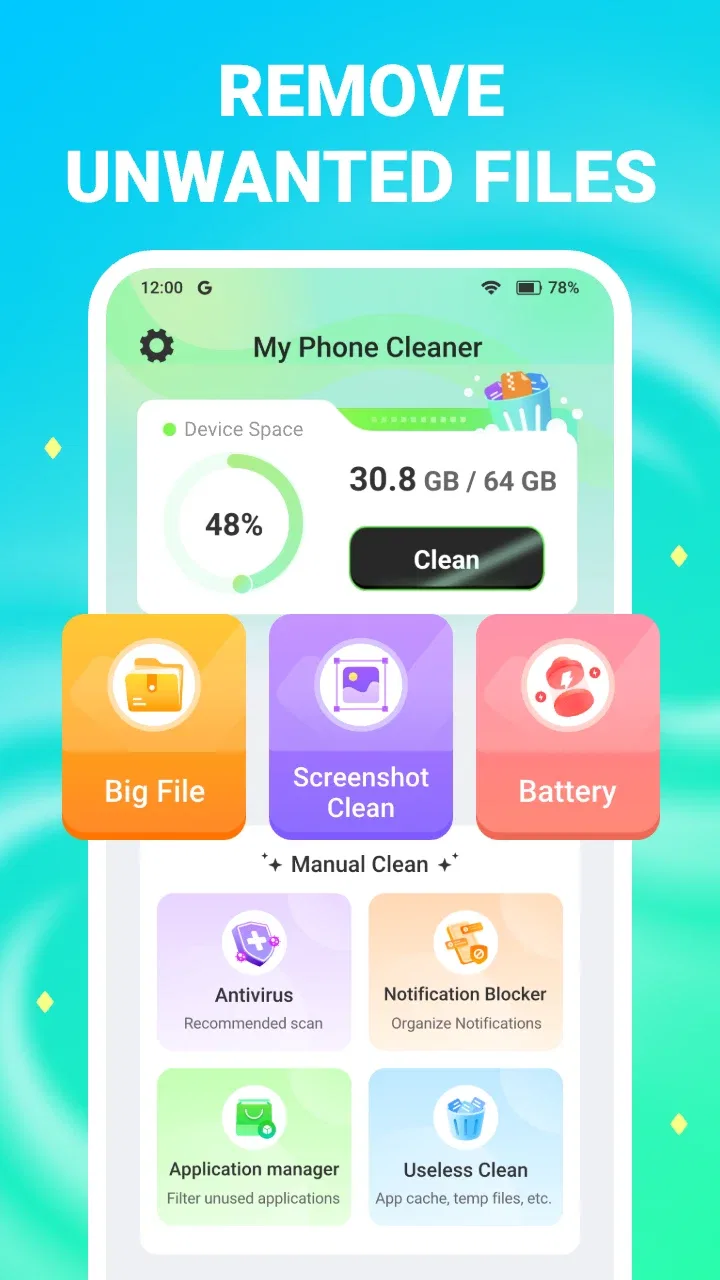
My Phone Cleaner
- 4.6
- Rating
- 1.00M
- Installs
- Free
- Price

 Analysis by App-foxy
I like phone-cleaning tools most when they make a messy storage problem easier to understand rather than simply promising a dramatic speed boost. My Phone Cleaner takes that practical route. It is a free tools app from Zaptox App that focuses on finding and removing files you no longer need. After using it, I see it as a straightforward option for people who want a guided cleanup routine without paying for a premium utility.
The app’s appeal is easy to understand. A phone gradually collects temporary files, leftover downloads, duplicate-looking items, and other clutter that is easy to ignore when storage is plentiful. When space starts running low, however, searching through folders manually becomes frustrating. My Phone Cleaner gives that task a dedicated place, which can make the difference between a careful cleanup and randomly deleting files from a file manager.
How I use My Phone Cleaner for a safe baseline cleanup
My first recommendation is to treat the initial scan as an inspection, not an instruction to delete everything immediately. A cleaner can identify material that looks unnecessary, but only I know whether a downloaded document, image, or video still matters. The safest routine is to scan, review the categories, remove obvious clutter, and then check the phone’s storage screen afterward.
You May Also Like

 Blood Strike: 2.5 Anniversary
Blood Strike’s Loadouts Turn Every Drop Into a Tactical Gamble
A close look at Blood Strike’s custom loadouts: how fast access to signature weapons reshapes its battle royale rhythm, rewards preparation, and narrows the gap between fights.

 Pandora - Music & Podcasts
Pandora’s Music Is Easy to Start, but Harder to Recover
Pandora’s strength is its low-effort path from a seed to a station. Its weak spot is how much confidence it asks you to place in connection, setup, and quiet recovery.

 8 Ball Pool
 Is Built on Rivalries, Rematches, and Routine
A close look at the rivalries, rematches, shared routines, and unanswered safety questions that turn a quick pool match into a persistent mobile community.

 Samsung Music
’s Quiet Strength Is Playing What You Already Own
Its reach comes less from spectacle than from dependable access to a personal library. That simplicity is both the app’s strongest retention engine and its ceiling.

 AccuWeather: Weather Radar
AccuWeather Review: A Quick, Clear Forecast for Everyday Decisions
For everyday plans, the best forecast is the one you can understand quickly. AccuWeather makes rain timing, radar, and local conditions easy to act on, with a few trade-offs.

 Hill Climb Racing
Why Hill Climb Racing Still Turns Crashes Into One More Run
A tiny car, a bumpy hill and one more upgrade: Hill Climb Racing keeps resurfacing because its simple chaos makes every near-miss feel personal.
More From Our News Desk



That workflow is especially useful before a trip or a system update. I can look for old downloads, temporary material, and files that have accumulated from ordinary daily use. Instead of opening every app one by one, I start with My Phone Cleaner to see where the largest opportunities are. I then keep anything connected to work, travel, school, or personal records, even if its filename looks unimportant.
A realistic example is a phone used for messaging throughout the week. Group chats may leave a trail of images, short videos, and forwarded files that are no longer useful. If I run a scan after an especially busy period, I can focus on items I recognize as disposable rather than clearing entire folders. This is a better habit than waiting until the phone is nearly full, when every decision feels urgent.
The app is also useful for people who are not comfortable navigating Android’s storage menus. Its purpose is clear, and the store summary describes it as a phone cleaner for useless files. That does not mean every result is useless, though. I would still open the review screen carefully, particularly when an item could be a personal photo, an offline document, or a file another app may still need.
One practical tip is to clean in small passes. I prefer removing obvious temporary clutter first, then returning later for larger personal files. This creates a useful pause between detection and deletion. It also makes troubleshooting easier: if an app behaves differently afterward, I have a better idea of what I removed instead of having cleared the entire device in one tap.
My Phone Cleaner runs on Android devices using version 7.0 or later, so its compatibility covers a wide range of phones. It is rated for Everyone, which suits its role as a general-purpose maintenance tool. The current version is 1.0.6, and I would keep the app updated through the normal app-store process so that the installed build remains current.
What the scan is good at, and where I stay cautious
The strongest part of this type of utility is organization. A phone’s built-in storage page can tell me which apps occupy space, but it is not always as convenient for reviewing miscellaneous clutter. My Phone Cleaner gives me a more focused starting point for cleanup. That is valuable when I know the phone feels crowded but do not yet know which folders deserve attention.
Its limitation is that no automated cleaner can understand the personal meaning of every file. A screenshot may be disposable, or it may be the only record of an important confirmation. A cached item may be safe to remove, but a downloaded file may be needed offline. I therefore see the app as a sorting assistant, not as a replacement for judgment or backups.
I also would not expect a cleaner to transform an older phone into a new one. Recovering storage can help when a device is close to its capacity, but it does not upgrade the processor, improve a weak battery, or repair an app that is poorly optimized. If the problem is overheating, crashing, or slow performance caused by a specific application, I would investigate that application directly rather than repeatedly running a cleaner.
Settings and habits worth checking before pressing clean
The most important “setting” is my own review threshold. I avoid automatic deletion when I have not looked at the categories first. I also make sure I am not in the middle of downloading something important, recording media, or preparing files for offline use. A cleanup session should be deliberate, because the convenience of a single button can make people move faster than they intended.
I use My Phone Cleaner after checking the phone’s built-in storage overview. That comparison gives me context: if videos are the main problem, a cleaner may not be the best answer; I may need to move or delete large personal files manually. If miscellaneous clutter is the issue, the app becomes more relevant. This two-stage approach prevents me from expecting the tool to solve a category it was not designed to manage.
Another useful habit is to review messaging apps separately. Media saved from conversations can be mixed with files I actually want to keep, and deleting broad groups without checking them can create regret. I prefer using the cleaner for clearly disposable material, then opening the messaging app or gallery when the decision depends on who sent a file or why I saved it.
I would also avoid installing several cleaners at once. Multiple utilities can make the same recommendations, create duplicated notifications, and encourage unnecessary maintenance. My Phone Cleaner works best as one consistent tool in a simple routine. If I already have a trusted file manager that gives me excellent visibility, adding another cleaner may not provide enough extra value.
The app is free, which makes trying that routine low-risk from a pricing perspective. Still, free does not mean I should grant automatic trust to every recommendation. I read each screen, keep personal files separate from disposable clutter, and use the phone’s own storage controls as a second reference. That small amount of discipline matters more than running a scan repeatedly.
For families, the Everyone content rating makes the app approachable, but I would still explain the cleanup process to less experienced users. Someone unfamiliar with storage categories may assume that every suggested item is worthless. A short explanation about checking photos, documents, and downloads can prevent accidental deletion and makes the app more useful as a teaching tool.
Faster patterns for regular phone maintenance
Once I understand the results, I can make the process quicker without making it careless. My preferred pattern is to scan at a calm moment, remove only obvious clutter, and stop when the phone has enough breathing room. There is no benefit in chasing every last file if the remaining items are personal or uncertain.
I also connect cleanup to a real trigger rather than opening the app out of habit. Good triggers include preparing for a long journey, freeing space before recording an event, or noticing that an update cannot download. This keeps the app purposeful. It also avoids the common mistake of treating a cleaner as a daily performance booster when the phone does not actually need maintenance.
A second pattern is to remember what created the clutter. If downloads are repeatedly accumulating, I change my behavior by reviewing them after using them. If messaging media is the main source, I become more selective about what I save. The cleaner handles the backlog, but the lasting improvement comes from reducing the amount of unwanted material created in the first place.
For a phone shared with work and personal activity, I would clean before an important deadline rather than during it. Removing clutter can free space, but it can also require careful review. Doing it earlier gives me time to restore or re-download something if I discover that I made the wrong choice. That is a small but important trade-off between speed and safety.
My Phone Cleaner is also easier to evaluate when I use it for a specific goal. If I need room for new photos, I first check whether personal videos are the real cause. If I want to reduce general clutter, I focus on the categories the app presents. This prevents vague expectations and lets me decide whether the results justify keeping the tool installed.
With an average rating of 4.5 from around twenty-three thousand ratings, the app has attracted substantial user attention. It has also passed the one-million-install mark. Those figures suggest that the basic idea works for many people, but they do not remove the need to review files personally. Popularity can indicate usefulness; it cannot tell me whether a particular recommendation is safe for my phone.
Where experienced users will notice the limits
The app is not the right choice for every storage problem. If I want detailed folder management, advanced sorting, cloud synchronization, or a complete backup workflow, I would choose a full-featured file manager or a dedicated backup service instead. A focused cleaner is convenient, but convenience comes from keeping the task narrow.
I would also skip it if my phone has plenty of free storage and I already understand exactly where my files are. In that situation, the extra scan may add little. The app makes more sense for people who want help identifying clutter, users who are regularly short on space, and anyone who prefers a guided process to manual folder hunting.
There is another important limit: removing temporary files does not guarantee a visible speed improvement. A phone may feel slow because of background activity, an aging battery, a demanding app, or limited memory. Cleaning storage can address one source of friction, especially when capacity is nearly exhausted, but it should not be presented as a universal performance fix.
I also keep expectations realistic about recovery. If I delete a personal file through a cleanup process, I do not assume it can always be recovered. Before a large cleanup, I copy important photos and documents somewhere safe using a method I already trust. My Phone Cleaner can help me decide what looks unnecessary, but it should not be my only protection against accidental loss.
Compared with the usual alternatives, the app sits between the phone’s built-in storage controls and a full file-management suite. The built-in tools are often enough for checking large apps and personal media. A file manager is better when I want to inspect exact folders and filenames. My Phone Cleaner is more appealing when I want a dedicated cleanup view and a simpler starting point.
That middle position is both its strength and its boundary. It can reduce the effort of finding ordinary clutter, but it cannot replace the precision of manual management. I would recommend it to someone who feels overwhelmed by storage maintenance, while an experienced Android user may prefer direct control through the system settings or a file manager.
My verdict after building a repeatable routine
My Phone Cleaner is most useful when I use it as a careful inspection tool, not a magic speed button. It gives everyday Android users a clear place to begin, costs nothing, and focuses on the common problem of unwanted files. The app’s straightforward purpose makes it easy to fit into a monthly or situation-based maintenance routine.
I appreciate that its value does not depend on complicated configuration. I can scan when storage becomes uncomfortable, review the suggestions, and remove only what I recognize as disposable. That workflow is particularly helpful for people who do not want to learn every Android storage menu. It also gives less technical users a chance to build better habits around downloads, shared media, and temporary clutter.
At the same time, I would not recommend blindly approving every cleanup result. The app cannot know which personal files matter, and it cannot solve problems caused by hardware, battery health, or badly behaved applications. Anyone who keeps important documents or irreplaceable photos on the phone should back them up and review categories before deleting anything.
The developer is Zaptox App, and the product is presented as a general tools app rather than a specialized file-management environment. That positioning feels accurate in my experience. It is a focused helper for reclaiming attention and storage, not a complete maintenance system. Its best results come from combining it with the phone’s own storage overview and a consistent habit of checking what I download and save.
For me, the deciding question is simple: do I want guidance while clearing ordinary clutter, or do I want complete control over every folder? If I want guidance, I would try this free cleaner. If I need advanced organization, backup, or precise file operations, I would use a different tool and keep My Phone Cleaner out of that workflow.
Overall, I would recommend My Phone Cleaner to Android users who regularly run short of space and want a simple first pass through unwanted files. I would describe it to a friend as a practical starting point: useful when paired with attention, less convincing when treated as an automatic cure for every phone problem. Used with that expectation, it can turn an annoying storage chore into a manageable routine.
FAQs for My Phone Cleaner
01What is My Phone Cleaner and how does it work?
My Phone Cleaner is an application designed to improve your smartphone’s performance by removing unnecessary files, clearing cache, and optimizing memory usage. It scans your device for junk files and provides you with options to delete them, freeing up storage space and speeding up your phone.
02Is My Phone Cleaner safe to use on my device?
Yes, My Phone Cleaner is safe to use. It is designed to perform cleaning operations without deleting any important files or personal data. However, it’s always a good idea to review the files marked for deletion and ensure you are comfortable with the actions before proceeding.
03Does My Phone Cleaner really improve phone performance?
Users often notice a significant improvement in their phone’s performance after using My Phone Cleaner. By removing junk files and optimizing storage, apps can run more efficiently, and the device may operate more smoothly. However, results can vary depending on the device's initial condition.
04Are there any costs associated with using My Phone Cleaner?
My Phone Cleaner is available as a free download with basic cleaning features. For more advanced features like scheduled cleanings and deeper scans, there may be a premium version available for purchase. Always check the app store for the latest pricing and feature updates.
05How often should I use My Phone Cleaner to maintain my device?
It’s recommended to use My Phone Cleaner at least once a week to keep your device running optimally. Regular cleaning helps prevent the accumulation of unnecessary files that can slow down your phone over time. However, you can adjust the frequency based on your personal usage patterns.
Pros
- Boosts phone performance effectively.
- User-friendly interface for easy navigation.
- Quickly frees up storage space.
- Enhances battery life noticeably.
- Includes junk file removal feature.
Cons
- Contains frequent ads during use.
- Limited features in the free version.
- Occasional app crashes reported.
- Requires access to many permissions.
- No scheduled cleaning option available.

My Phone Cleaner
Gallery